
Printable household budget template – three PDF sheets (A4)
Here are three printable household budget templates as PDF – free, no email required: a monthly sheet in A4 landscape with a column per category and a row per day, a weekly sheet for the kitchen table, and a yearly overview with twelve monthly columns. All three share the same pre-printed categories, save ink and fit together.
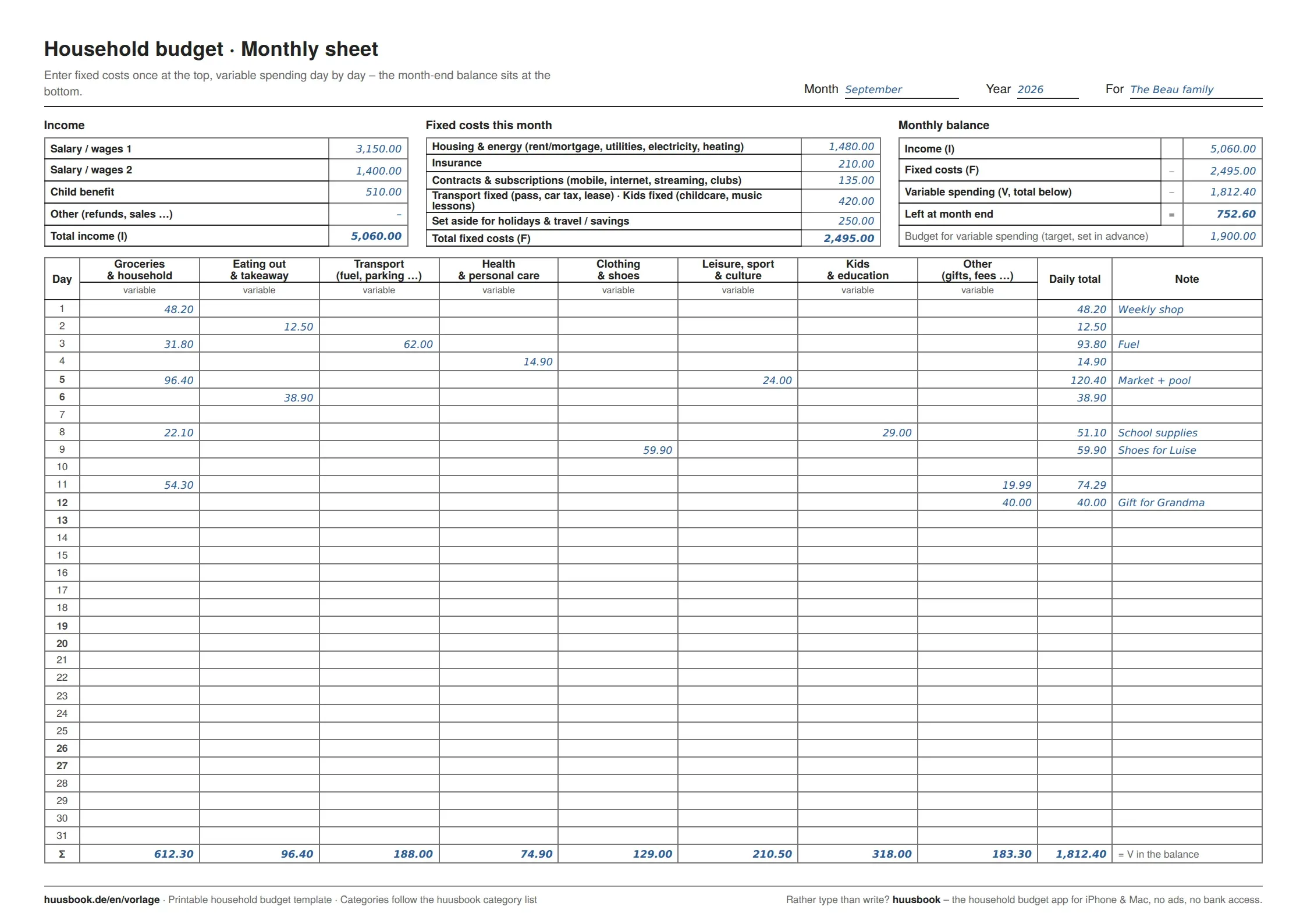
A household budget on paper has one advantage no app can beat: it sits on the kitchen table, and everyone in the household can see it. The downside is that most PDF templates online consist of a single table – no categories, no separation of fixed costs and everyday spending, no room for a balance. So instead of one template, you get three that belong together: the monthly sheet is the workspace, the weekly sheet is for anyone who prefers copying receipts day by day, and the yearly overview collects the totals at month end. Download all three, print them, and start with the current month – not on the first of the next one.
Downloads
free · no email required · available right away
Which of the three templates is right for you?
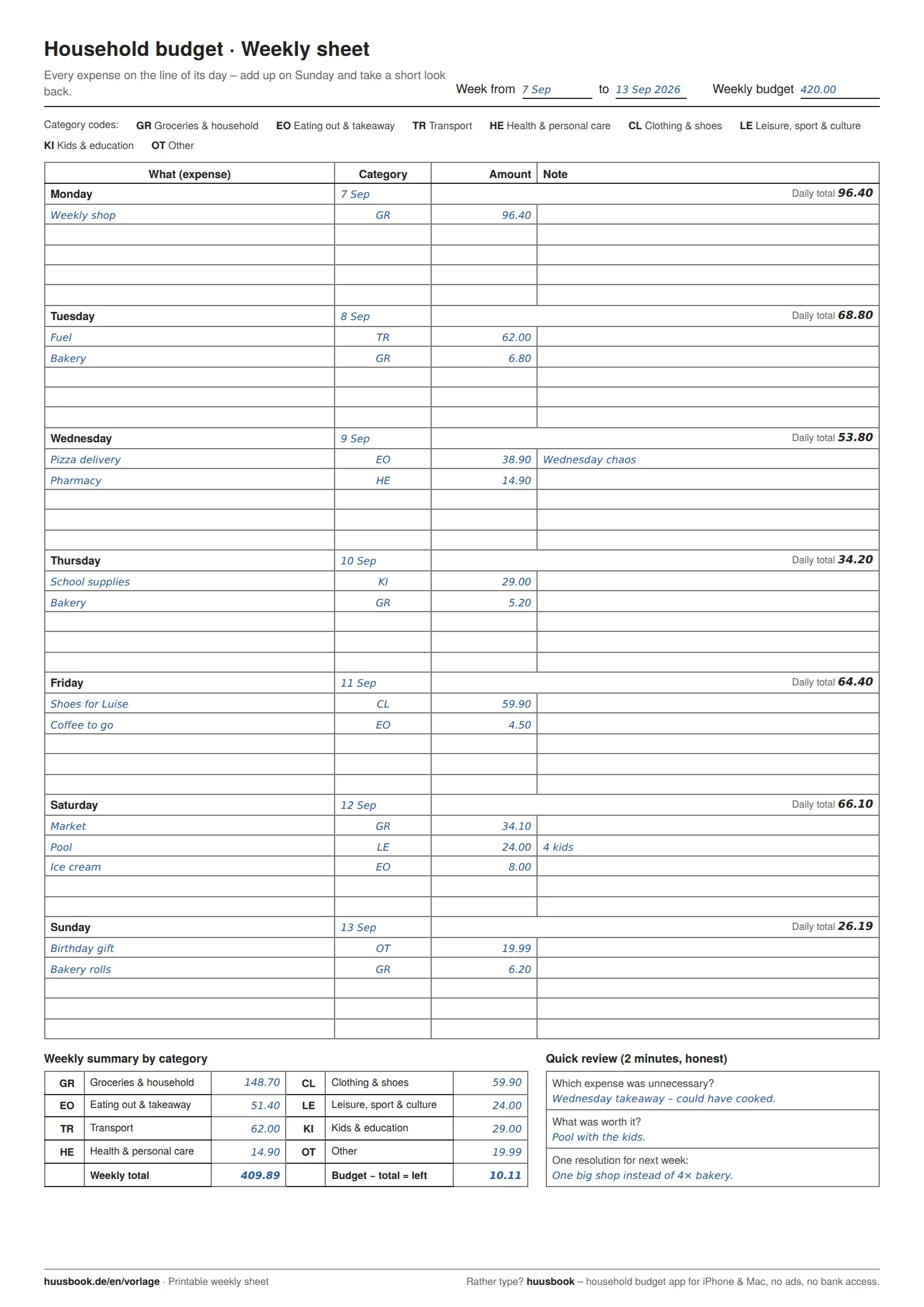
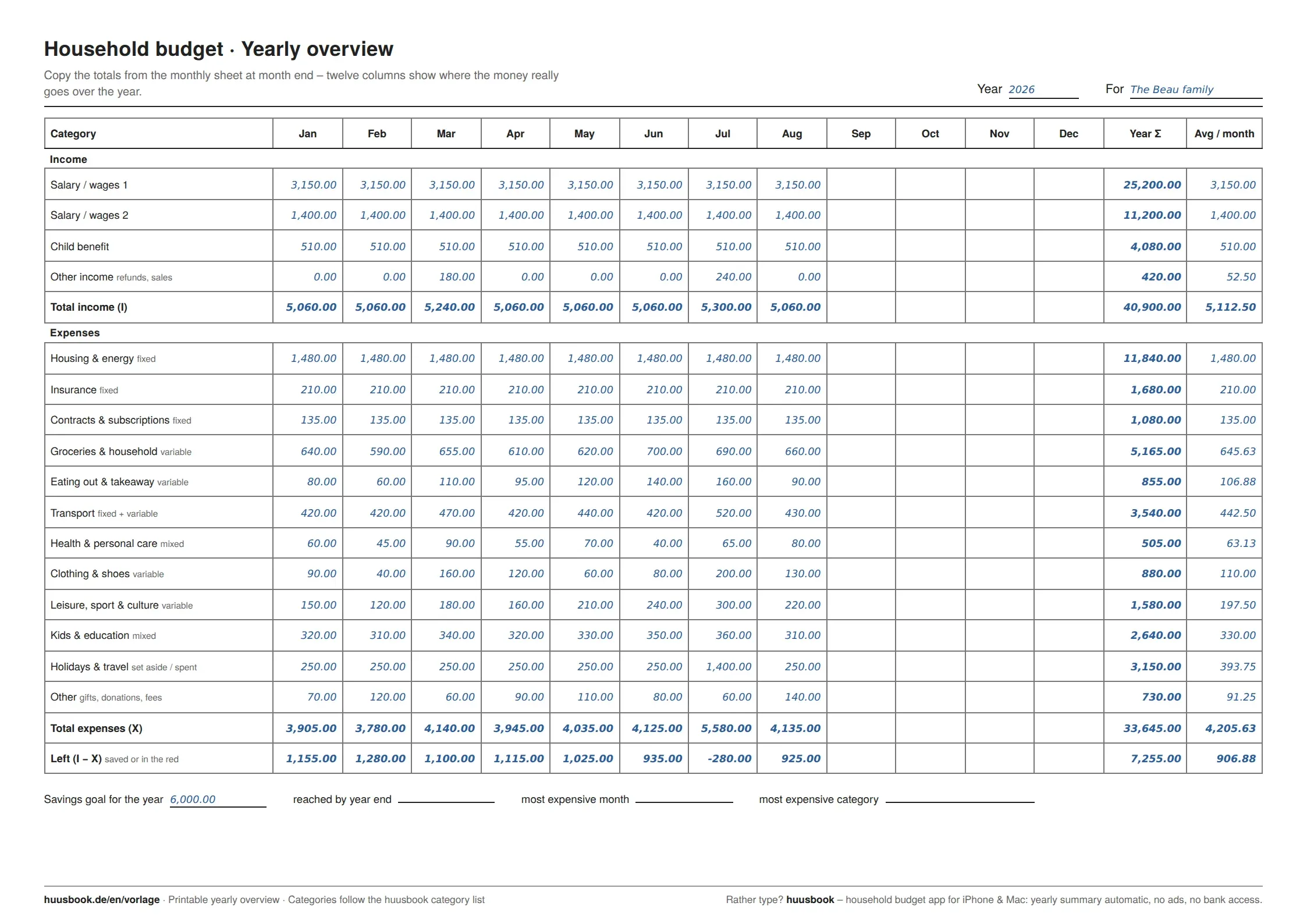
If you're keeping a household budget for the first time, take the monthly sheet. It forces you to do exactly two things that make the difference: enter fixed costs once at the top, and put every variable expense in the column of its category. After one month you know what's left – and whether that number is positive. The weekly sheet is for households where several people write things down (one sheet per week on the fridge, five lines per day, category codes instead of columns). You'll only need the yearly overview from the second month on: it takes the column totals from the monthly sheet and, after a few months, shows which category is really the hole in the budget.
Template | Format | What for | Effort |
|---|---|---|---|
Monthly sheet | A4 landscape, 1 page per month | Fixed costs, income, 31 days × 8 variable categories, monthly balance | 1–2 minutes a day |
Weekly sheet | A4 portrait, 1 page per week | Expenses line by line with codes, weekly total, quick review | 5 minutes on Sunday |
Yearly overview | A4 landscape, 1 page per year | Monthly totals per category, yearly total, average, savings goal | 5 minutes at month end |
What's different about these templates
Fixed costs are not in the daily table. Rent, insurance, subscriptions and childcare don't change from day to day, so they get their own block at the top of the monthly sheet. The daily table only holds the eight categories where you actually make decisions: groceries, eating out, transport, health, clothing, leisure, kids, other. That's the difference between “I write everything down” and “I can see where I can change something”.
The categories are pre-printed – and they're the same as in the app. The twelve main categories come from our category list, which we developed for huusbook. Anyone who later moves from paper to the app doesn't have to re-sort anything. And anyone who sticks with paper still has a structure that has proven itself, instead of inventing one on the first evening.
The balance is on the sheet. Income minus fixed costs minus variable spending equals “left at month end”. Sounds trivial, but it's missing from almost every template – and it's the only number that counts in the end. Above it there's a field for the variable spending budget: fill it in at the start of the month, and the month has a target.
Ink-saving. No coloured areas, no logos across half the page, thin grey lines. A year of monthly sheets costs a handful of pages in black and white.
How to start – in five minutes
Print the monthly sheet (A4, landscape, “actual size” rather than “fit to page”). At the top, enter the income that will definitely come in this month and the fixed costs that will definitely go out – last month's bank statement is enough as a reference. Add up both and decide how much may be left for variable spending. Then the sheet lives wherever the receipts land, and every expense goes into its column the same evening. At month end, add up the columns, fill in the balance, copy the totals to the yearly overview – and print the next monthly sheet.
Honest tip from experience: the first month almost always turns out worse than expected – not because you spend more, but because you see everything for the first time. That is exactly where most people give up, and exactly why it pays to keep going. How we do it with four kids is in the DeepDive.
Budget planner or budget book – same sheet?
Yes. The budget planner holds what you intend to spend in each category; the budget book holds what actually went out. The monthly sheet has room for both: the budget for variable expenses at the top, the balance at the bottom. If you searched for a printable budget planner, you are in the right place – the sheet is the same.
Paper or app – or both?
Paper wins at making things visible and at getting started. The app wins as soon as you want totals without doing the maths, want to compare several months, or enter things on the go. Many people start with the monthly sheet and switch after two or three months – by then they know their categories and what they expect from an app. huusbook uses the same categories as these templates, runs on iPhone and Mac, with no ads and no access to your bank account. The basic version is free, and if all you want is the paper, you get everything here with nothing in return: no newsletter, no email address, no account.
All templates at a glance
Besides the three printable PDFs, the overview lists all household budget templates from huusbook – including the Excel template with automatic totals. If you're not sure which one fits: paper to get started, Excel for the analysis, the app for everyday life.
Frequently asked questions
Can I fill in the PDF template on my computer?
No, the three templates are deliberately print-only, without form fields. If you'd rather enter things on the computer, the Excel template is the better choice – it also calculates the totals for you.
Which paper size and print settings?
A4. The monthly sheet and yearly overview are landscape, the weekly sheet is portrait. In the print dialog choose “actual size” (100 %), not “fit to page”, otherwise the rows shrink. Black and white is enough – the templates have no coloured areas.
Why aren't rent and insurance in the daily table?
Because they don't change daily. You enter fixed costs once at the top; the daily table is only for variable spending. That way you immediately see where you actually have influence in everyday life – with rent, you don't.
Can I use my own categories?
Yes, the column headings can be crossed out or added to. The twelve pre-printed categories are our recommendation from the category list – they cover most households, and anyone who later uses the app will find the same structure again.
Do I have to register or give an email address?
No. Click download, done. No sign-up, no newsletter, no watermark.
May I pass the templates on, for example at school or in debt counselling?
Yes, gladly – printing, copying and sharing is expressly allowed as long as the huusbook.de note at the bottom of the sheet stays. They may not be sold.
How often should I write things down?
Daily, ideally in the evening while the receipts are still in your pocket. If that doesn't work for you, take the weekly sheet and sit down for five minutes on Sunday – still better than an empty monthly sheet.
Also worth a look
Household budget template for families – who spends what?
A free household budget template for families: an Excel file with a person column, twelve categories, a budget per category and a yearly overview, plus a printable family sheet with one column per person. Child costs are split into fixed, variable and pocket money. No login, no email, no bank connection.